When VBA is too risky and every task needs not Excel but a working application
FAQ — What Does This Article Answer?
Q: Can I run a converted Excel workbook on a computer without Excel installed?
A: Yes. The converted application runs as a standalone Windows executable, meaning that no Excel installation is required on the target machine. The logic, formulas and automation all work exactly as before, but independently of Excel entirely.
Q: Will my data be locked inside the application after conversion?
A: No, full export capability is retained by every converted application. Data can be extracted at any time as a clean, structured XLSX file, ready for further analysis, import into other systems or reporting without any re-entry or conversion.
Q: What happens to the VBA code and formulas after conversion?
A: The logic, formulas and automation are preserved exactly as they were in the original workbook. The key difference is that the VBA code is no longer exposed or accessible to the end user, and macro security warnings no longer appear on startup.
Q: How does the licence key system work and can I control who uses the application?
A: Each converted application is delivered with a licence key entered on first startup. The licence stipulates the duration, which can be either evaluation, fixed term or lifetime, and also the number of machines. Please be advised that there are no automatic renewal or subscription mechanisms in place. The arrangement is decided upon in advance.
Q: How do I know whether my workbook is suitable for conversion before paying for the full service?
A: The process commences with a compatibility check, which involves a written assessment to determine the feasibility of conversion, the associated costs and the steps involved. For workbooks that are compatible, a trial version can be produced from your actual file, enabling you to test it in your own environment before committing to the full conversion. The trial fee is deducted from the full project cost.
It is common for businesses to have at least one Excel workbook that has become an essential component of their operations. It calculates important data, tracks critical processes and automates time-consuming tasks, saving considerable time and effort. The system was built a number of years ago, or perhaps last month, and it is now relied upon by the entire team.
However, the same workbook did cause an issue at a later stage.
When Excel is not sufficient.
As you are aware, the situation is as follows. A colleague opens the file and receives a security warning: Please be advised that macros have been disabled. The IT department has updated its security policy and is now blocking all macro-enabled files. Another possibility is that the person who originally created the workbook has since left the company, and there is no one available to provide maintenance. In the event that you wish to provide a client, partner or new employee with the tool, but they do not have Excel installed or their version differs, the functionality may be affected.
These issues do not stem from any technical malfunctions. These are business problems. They have devised a pragmatic solution that many people have not previously contemplated.
The fundamental issue at hand is not concerned with the resolution of the technical issues with the workbook.
When a business reaches this point, the instinct is usually to look for new software. We are looking for a ready-made solution, a software as a service (SaaS) subscription, or a custom-built application. This means cost, time, training, data migration and – more often than not – a tool that performs 80% of the functions of the old workbook, but not the 20% that actually mattered.
A more appropriate question would be: what if the workbook itself could become the application?
What alterations are made when transitioning from a workbook to an application?
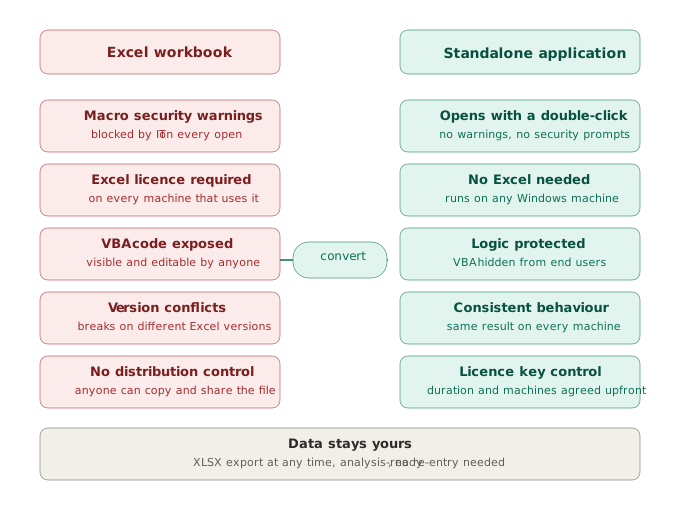
An Excel workbook converted into a standalone Excel application will appear and function like professional software. The programme launches with a double-click. It does not require Excel to be installed. It does not display macro security warnings. The formulas, logic and automation all work exactly as before, but the file is no longer a spreadsheet. It is an executable application that runs independently on any Windows machine, but not on Macintosh OS.
For the person using it, nothing feels unfamiliar. The screens, buttons and workflow remain unaltered. The key differences are in the software's outward appearance: it is not dependent on Excel, it does not expose VBA to the user, and it does not display a security warning upon first opening.
For the business, the difference is significant. The tool can be distributed to any relevant parties without the concern of Excel licence restrictions. It can be deployed on shared machines, site computers or client devices. It is possible to obtain a licence for this software, which would allow you to control its usage, including the number of machines and the duration of use.
With regard to the data, what is the situation?
A common concern when transitioning away from Excel is the potential loss of data access. This is not a possibility. The application retains full export capability — data can be extracted as a clean, structured XLSX file at any time. This ensures that the information remains analysis-ready. It can be imported into other systems, processed further or used for reporting without any re-entry, scanning or conversion. The data is output exactly as it is input.
Licensing: a flexible approach without unnecessary complexity
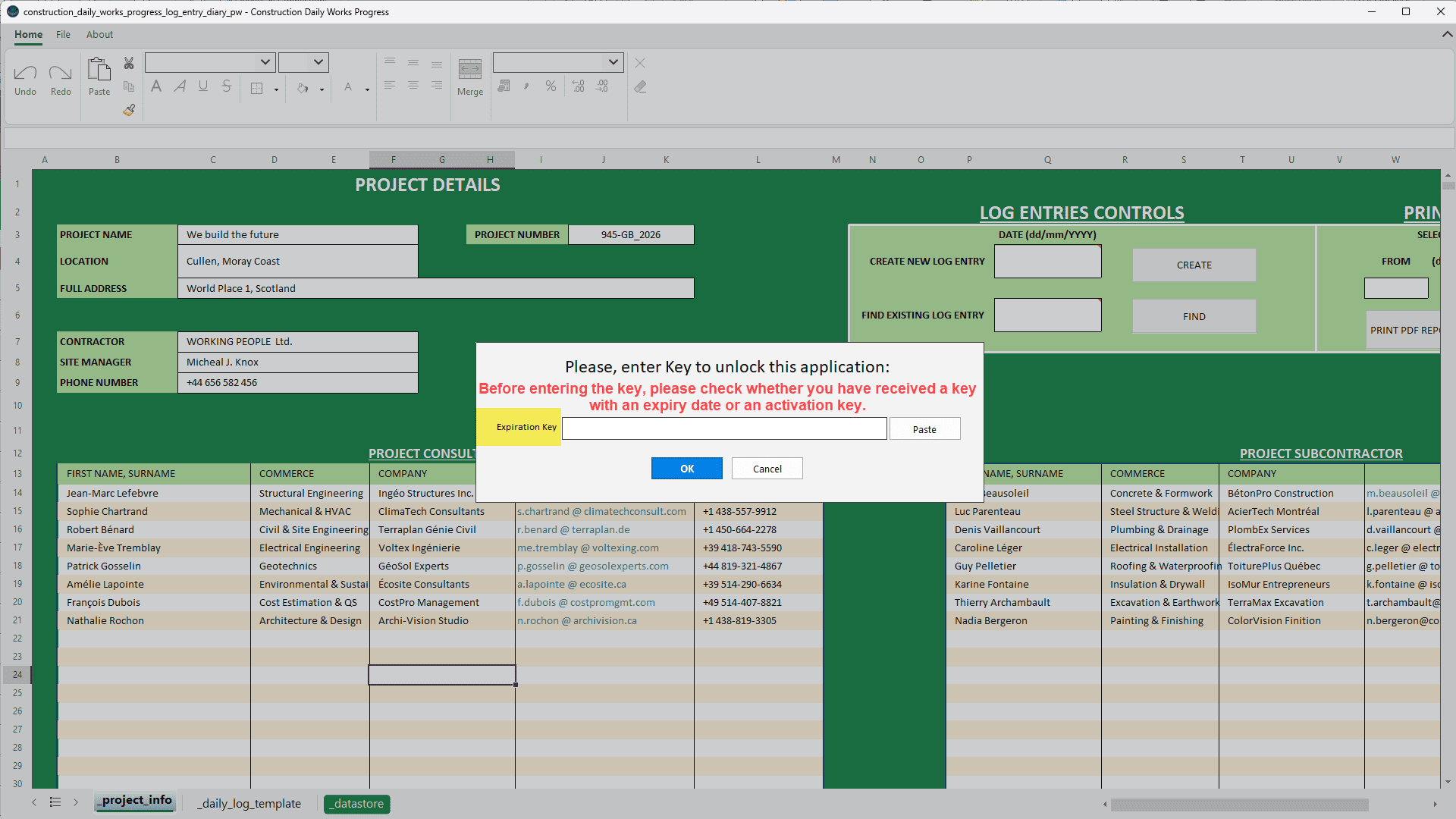
Each application that has been converted is delivered with a licence key that is entered when the application is first started. The licence stipulates the duration of the application's validity and the number of machines it can be used on. It can be assigned a short evaluation period, a fixed term of three or six months, or a lifetime licence. The arrangement is agreed in advance, and there are no automatic renewals or subscription mechanisms.
Time-limited licences serve a practical purpose that has no bearing on restricting customers in any way. Business requirements are subject to change. It is important to note that a workbook designed for five employees may not be suitable for fifty. A tool designed for one construction site may need to be adapted to cover ten. A review at licence renewal is an opportune moment to ensure that the application remains relevant and to implement improvements if necessary.
This is just one example of many possibilities.
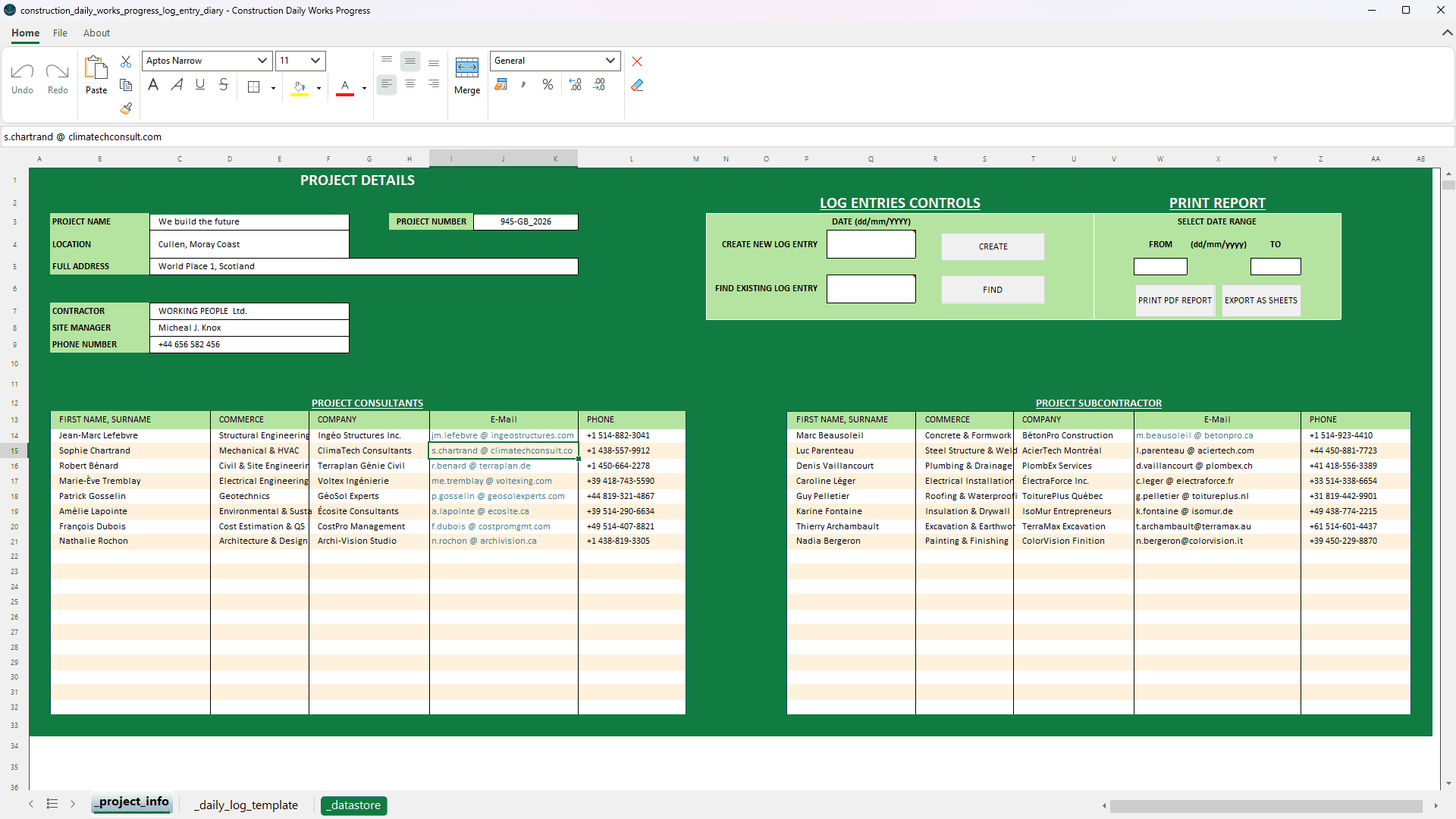
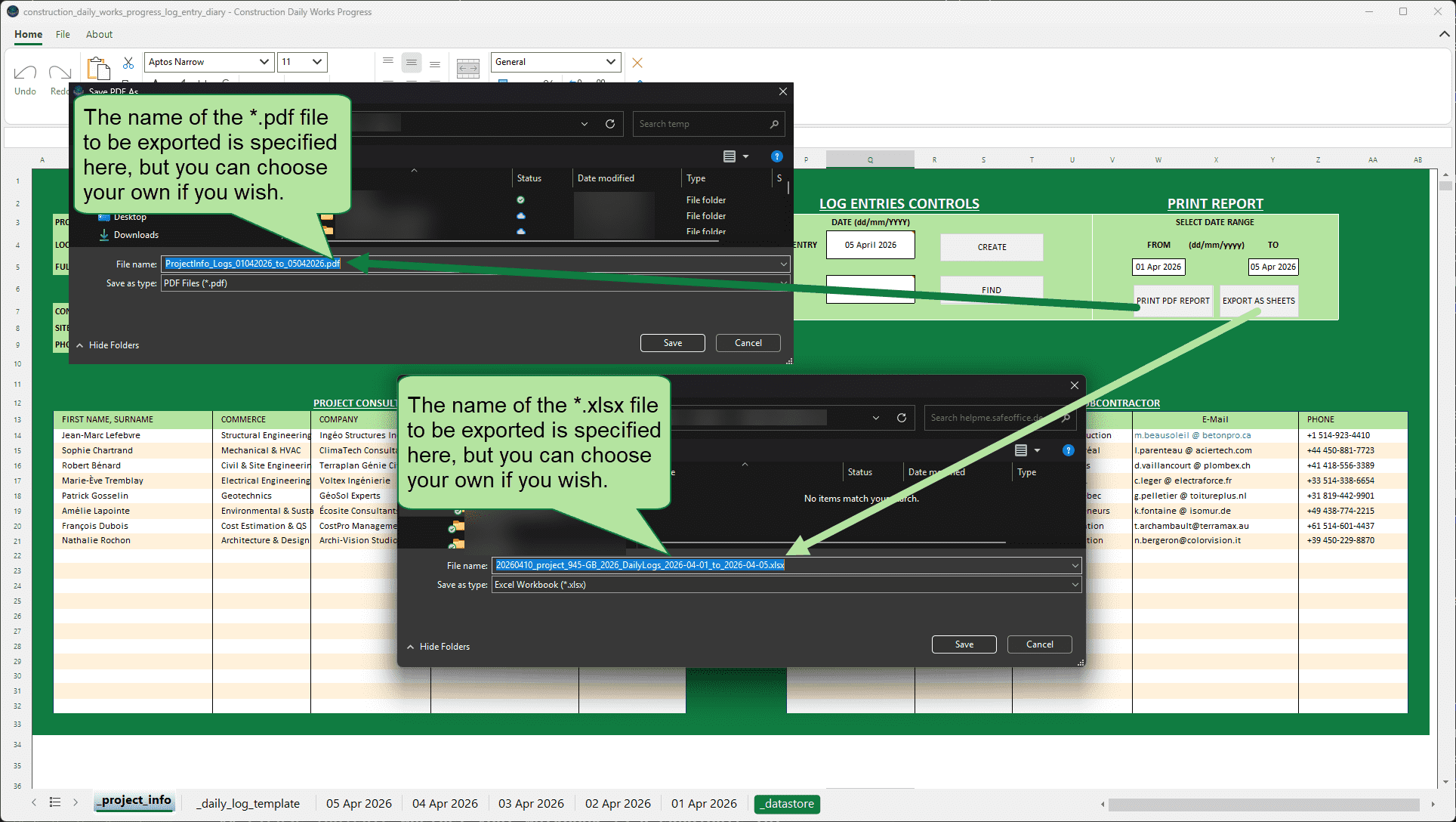
To illustrate this point, one application successfully converted using this approach is a construction site daily works progress diary. Site managers utilise this system to meticulously document a range of key activities, including the daily activities of workers on site, the equipment in use, materials received, visitors, weather conditions and working hours. At the conclusion of a specified period, the system automatically generates two documents: a date-range PDF for documentation purposes and an XLSX file for analysis. These documents are generated with a single click.
The application runs on site laptops without Excel. The system is operational within seconds. New daily entries are created with one click. You can find any previous entry by selecting the relevant date. The data is exported as a structured XLSX file, enabling months of site records to be fed directly into cost analysis, productivity reporting or project management tools without the need for manual processing.
This is just one example of the kind of thing we can do. The same approach can be applied to a variety of business applications, including HR reporting systems, financial overviews, quote calculation tools, inventory management, project budget trackers, and any other workbook where the logic is sound but Excel dependency has become a limitation.
Please indicate whether your workbook is a candidate for conversion.
It is important to note that not all workbooks are compatible with this software and some adjustments may be required. Files with complex external connections or specific dependencies may require preparation before conversion. The process commences with a compatibility check, which involves a thorough evaluation to ascertain the viability of conversion, the associated costs and the timeframe. If this is not feasible, the answer will be provided clearly and at minimal cost.
For workbooks that are compatible, a trial version can be produced first, a working executable with a short-term licence built from your actual file, so you can test it in your own environment before committing to the full conversion.
There are three possible ways to begin.
You are invited to see it in action at no cost.
You can download a working example of the construction site diary described above. The installation of this software on a Windows machine is the first step in a process of testing with team members. This will allow for the assessment of the appearance and functionality of a converted workbook. There is no fee or obligation. Please note that the successful conversion of your workbook is not guaranteed by this example. Each file is unique. Please send me an email to request the licence key.
Check your workbook for a small fixed fee.
Please send your workbook and a description of how it is used. You will receive a detailed written assessment, including a determination of compatibility, a comprehensive overview of the involved elements, and an estimate of the costs involved in proceeding.
Prior to final commitment, clients are invited to assess the quality of the workbook by paying a nominal trial fee, deducted from the overall cost of the project.
You will receive a working executable of your workbook, along with a short-term licence. Please conduct internal testing on your live systems. Should you be satisfied with the service, the trial fee will be deducted from the full conversion price.
Please feel free to view it before proceeding with the download.
Prior to installation, it is advisable to observe the application in operation. The short video below shows the construction site diary running on a standard Windows laptop, using Excel, with no setup, just a double-click.
[VIDEO is coming soon]
Download the free trial
The construction site diary is available as a free 1-month trial executable. To obtain a licence key, please contact me via e-mail.
NO version of Excel needs to be installed.
Please note that the download is a ZIP file containing a file named “construction_daily_works_progress_log_entry_diary.exe”. Windows may display a security warning when you attempt to run this file and prevent you from doing so. In this case, please contact your IT department.
Please feel free to contact me by email if you have any questions.
Should you wish to discuss your own workbook, please contact me via e-mail from the contact link in the footer.
This article forms part of the helpme.safeoffice.de series, which provides practical guides on data solutions, workbook modeling and process documentation for businesses that require tools that are effective, durable and easily comprehensible to all users.