Before we begin: What this workbook is really doing
A spreadsheet that thinks for itself
Most Excel workbooks are passive. You put numbers in and get numbers out. The formulas are servants. They sit quietly in their cells. They wait to be told what to calculate.
The workbook we are about to examine is built differently. It does not wait to be told. When you add a new budget category to the setup sheet, the cost baseline is automatically updated for every month of the project. When you log an invoice in the ledger, the actual cost totals update and the time-phased distribution recalculates. The variance figures in the summary report also adjust — all without you having to touch another cell. Change the project end date and the month header row will expand or contract to match. In a meaningful sense, the workbook is alive.
This series of four articles (Cost Baseline Expenditure Schedule 01-04) explains exactly how that works.
What this could become:
A well-designed workbook does not have to stop at cost tracking. Imagine the same structure expanded to include a project management sheet with tasks, owners, dependencies and deadlines, feeding a Gantt chart that updates whenever a date changes. Add a Kanban board on top of that and the task data that drives the timeline now drives a live workflow view showing what is planned, what is in progress and what is complete. Add a sheet that monitors the numbers, comparing planned progress against actual spending and flagging categories that are burning through the budget faster than the schedule allows. This sheet can also surface tasks that need attention before they become problems. At that point, the spreadsheet is no longer just a record of what happened. It becomes a system that tells you what to do next. The following articles explain how to build the foundation for exactly that kind of tool.
What the workbook is for:
'Cost_baseline_expenditure_schedule_rev_06' is a project cost management tool designed to meet the specific needs of an Italian company. Initially developed for a project running until 2024, it has been continuously improved since then. Its advantage over commercial software is that it can be fully adapted to individual requirements in a timely manner.
In project management, a cost baseline is more than just a total figure; it's a month-by-month spending plan that shows how much money should have been spent by any given point in the project. Without a baseline, performance cannot be measured. For example, you might know that you have spent €500,000, but without knowing whether you were supposed to have spent €400,000 or €600,000 by now, that number is meaningless.
This workbook automatically builds the baseline, continuously compares it against real expenditure pulled from a transaction ledger and highlights the variance — all driven by a handful of formulas that most Excel users would never have written.
The following is a list of things you will learn by reading this series:
These articles are aimed at advanced Excel users who are familiar with functions such as VLOOKUP, SUMIFS and nested IF statements, but who may not have worked extensively with Excel's newer dynamic array engine or LET-based formula patterns. If this sounds familiar, this series will challenge you in several ways.
You will see LET being used seriously, not just to avoid repeating an expression, but as a genuine structuring tool — a way to break down complex, multi-step calculations into named, readable stages that can be understood independently. The workbook uses 'LET' to pull entire input tables from another sheet, name intermediate arrays and build self-documenting formula logic that would otherwise be a single, unreadable, nested expression spanning hundreds of characters.
You will see that MAKEARRAY and LAMBDA are used in place of a grid of individual formulas.The entire cost distribution matrix, which has thirteen categories across eleven months, is produced by a single formula in one cell. The conceptual centrepiece of this series is understanding how MAKEARRAY iterates over a two-dimensional space and how the inner LAMBDA receives each (row, column) coordinate to compute a single cell value.
You will also see dynamic arrays being used as infrastructure rather than just outputs: the month header row expands automatically using SEQUENCE and EDATE. The input table is generated by a single LET/HSTACK formula. Named ranges act as a contract between sheets, keeping formula logic decoupled from physical cell addresses. These are not tricks; they are architectural decisions that make the workbook maintainable.
You will see a two-dimensional SUMIFS that produces a full matrix in one expression. By passing arrays as both criteria in a SUMIFS, the workbook searches rows and columns simultaneously, transforming a traditional grid of individual lookup formulas into a single, elegant formula.
You will also see NETWORKDAYS.INTL being used for cost allocation, not just scheduling. The workbook does not distribute costs by calendar day; instead, it weighs each month's allocation by the number of working days that fall within it, using a dedicated holiday calendar specific to Sardinia. This subtle but important choice has real consequences for baseline accuracy.
How the four sheets fit together
The workbook maintains a clear separation of concerns across its sheets. Before delving into the details of the formulas, it is helpful to keep the overall structure in mind.
SETUP_BASELINE is the single source of truth for project parameters. All category names, budget figures, start dates and end dates are stored here. The other sheets do not store this data; they reference it. This means that changes only need to be made in one place, after which the rest of the workbook adapts.
AUTO_PROSPETTO_COSTI is the cost baseline. The data from 'SETUP_BASELINE' is used to calculate the budget for each category, which is then distributed across the months it is active, weighted by working days. The result is the official spending plan — what should happen.
DATI_COSTI_EFFETTIVI is the actual cost tracker. Its structure mirrors that of the baseline sheet exactly, but its numbers come from the transaction ledger rather than estimates. The result shows what did happen.
REGISTRO_ENTRATE_&_USCITE is the transaction ledger, which is the raw log of every invoice and payment. Every entry automatically flows upwards into the actual cost sheet.
CATEGORIE_STIMATE_VS_EFFETTIVE provides the final piece of the puzzle. It pulls together the total estimated budget and the total actual cost for each category, calculates the variance and presents the comparison in a clean summary table.
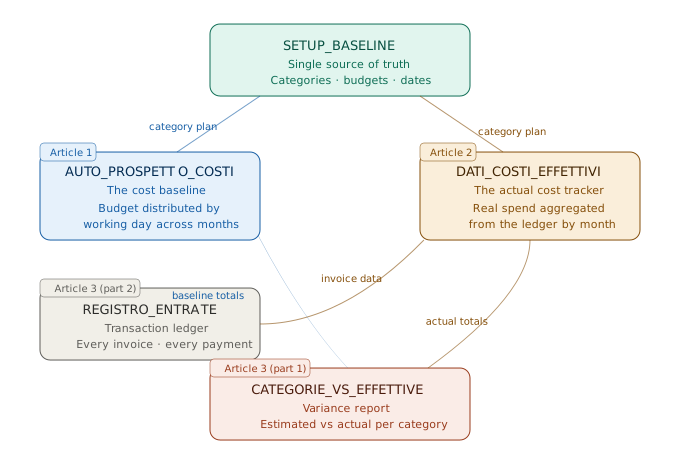
Data always flows in one direction: from the SETUP_BASELINE and ledger to the two calculation sheets and then into the variance report. Nothing flows backwards. This one-way architecture is what makes the workbook reliable: there is no circular dependency, no risk of accidentally overwriting a formula with a value and no ambiguity about which number is authoritative.
Focus on the following as you read:
Each article covers one worksheet in depth, taking you through the formulas in the order that you would encounter them if you opened the workbook yourself. As you read, bear in mind the following points:
The first is the role of named ranges: almost every formula in this workbook refers to named ranges rather than cell addresses. These names appear repeatedly: COSTESTIMATE, STARTDATE, _DataFestivita and ACTUALSTARTDATE. Pay attention to what each one points to and why. Named ranges are not just cosmetic; they are the connective tissue that enables formulas on one sheet to respond to changes made on another.
The difference between the baseline and the actuals. The two main calculation sheets have the same structure but opposite functions. The baseline sheet allocates a set budget over time using a working-day model. The 'actuals' sheet aggregates past transactions using lookup logic. Understanding this distinction will help you to follow the formula logic in each case.
The cost of automation. the formulas in this workbook are not simple. One cell in the distribution matrix contains a combination of MAKEARRAY, LAMBDA and LET that spans twenty-five lines when formatted for readability. This complexity is the price of automation, and the articles will argue that it is worth paying. However, as you read, consider the alternatives: a grid of individually entered 'IF' statements, a VBA macro or a pivot table that is updated manually. The formula approach is harder to write, but easier to trust.
The structured table forms the foundation. The transaction ledger is stored as a formal Excel table (tbl_Registro_UE), rather than as a plain range. This is no coincidence. It is the structured reference syntax — tbl_Registro_UE[CATEGORIA], tbl_Registro_UE[DENARO OUT] — that makes the SUMIFS formulas in the actual cost sheet readable and robust. When you see a structured reference in a formula, recognise it as a deliberate design choice rather than just a naming convention.
A note on versions is provided below.
This workbook contains several formulas that use functions not available in earlier versions of Excel. These are: LET, LAMBDA, MAKEARRAY, BYCOL, HSTACK and SEQUENCE. The only versions of Excel that include these are Excel 365 (or Excel 2021 and later). If you are using an older version, some of the formulas will not be available to you. However, the logic described here can be applied to alternative approaches using helper columns and array-entered legacy formulas. These alternative approaches will be noted where relevant.
Ready to begin
The three articles that follow move from the most complex sheet to the simplest, in line with the natural flow of data through the workbook. Begin with AUTO_PROSPETTO_COSTI to understand how the baseline is constructed from scratch. Alternatively, start with REGISTRO_ENTRATE_&_USCITE if you would prefer to begin with the raw data and work upstream. Either approach will lead to the same level of understanding.
In any order, you will find a workbook that has been designed with genuine care, not just to produce the right numbers, but to produce them in a transparent and maintainable way that is worth learning from.
Read the next part of this series. A complete, time-phased cost base is created using just a single formula. Cost Base Expenditure Plan, Part 2