TRUE and FALSE: The Hidden Numbers Inside Every Excel Formula
FAQ - What Does This Article Answer?
Q Why does =SUM(A1:A6>100) return #VALUE! instead of a number?
A: Because SUM refuses to coerce logical TRUE/FALSE values to numbers automatically. You need '--' to force the conversion first.
Q: What is '--' actually doing in a formula like =SUM(--(A1:A6>100))?
A: The first minus turns TRUE into −1 and FALSE into −0. The second minus reverses the sign, leaving TRUE as 1 and FALSE as 0 — pure numbers that any function will accept.
Q: How does SUMPRODUCT know which values to include and which to ignore?
A: It multiplies each value by its corresponding 1 or 0. Anything multiplied by 1 survives unchanged. Anything multiplied by 0 disappears. The sum of what remains is your answer.
Q: Is COUNTIF secretly doing boolean arithmetic under the hood?
A: Yes. It builds an array of TRUE/FALSE values from your condition, coerces them to 1s and 0s, and sums them. The result is a count — but the mechanism is pure multiplication.
Q: Why do professional Excel formulas use SUMPRODUCT instead of COUNTIF or SUMIF for complex conditions?
A: Because SUMPRODUCT lets you combine multiple boolean arrays using multiplication — each condition becomes a filter, and only rows where every condition is TRUE (1 × 1 × 1 = 1) survive. COUNTIF and SUMIF can only handle one condition range natively.
The secret Excel never told you
Open a blank cell in Excel and type =1=1. Press Enter.
The cell shows TRUE.
Now type =1=2 in the cell next to it.
FALSE.
Most Excel users see this and think, 'Fine, it's a yes/no answer.' A label. Something IF uses. They move on. However, something more important is happening here. Once you recognise this, a large part of how Excel actually works will suddenly become clear.
TRUE is not just a word. It is the number 1.
FALSE is not just a word. It is the number 0.
Always. Without exception. In every formula, in every version of Excel and in every language. It is not a convention or a trick; it is the mathematical foundation on which Excel's entire formula engine is built. Once you know it, you will start to see it everywhere.
Proving it with your own eyes
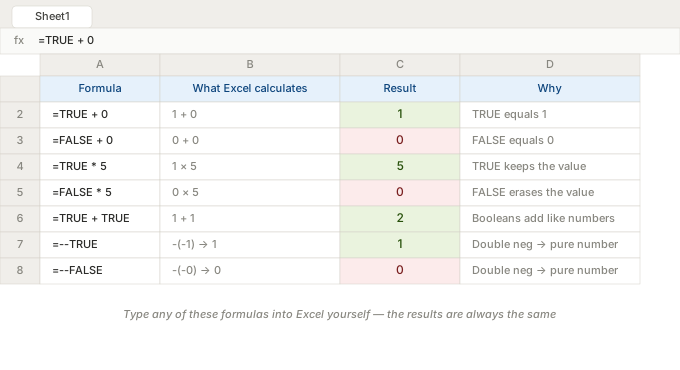
You don't have to take my word for it. Type the following into any cell:
=TRUE + 0Excel returns 1.
=FALSE + 0Excel returns 0.
=TRUE * 5Excel returns 5.
=FALSE * 5Excel returns 0.
TRUE behaves exactly like 1 in arithmetic. FALSE behaves exactly like 0. They are the same thing, dressed differently.
What this means for arrays
The real power emerges when you have not just one Boolean value, but an entire column of them.
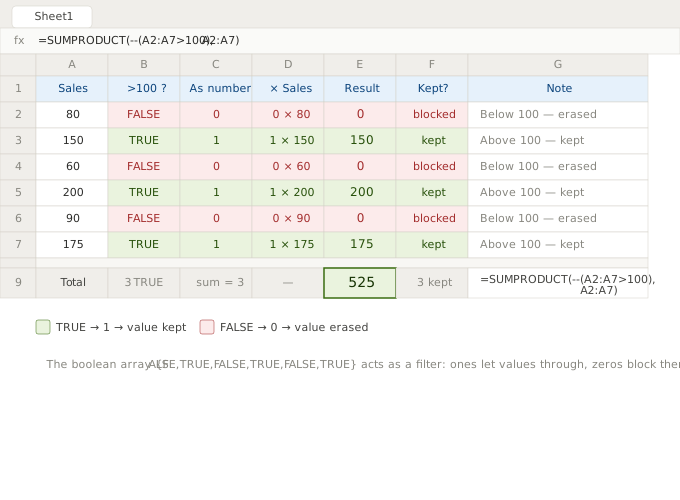
Imagine you have a short list of sales figures in column A and want to know how many are above 100. You could count them by hand or let Excel produce a column of TRUE/FALSE values — one per row — and then sum them.
Here is what that would look like, step by step, using a list of six values: 80, 150, 60, 200, 90 and 175.
Step 1 — Ask the question for each row:
=A1:A6 > 100Excel evaluates this once for each cell in the range and returns an array of boolean results:
{FALSE, TRUE, FALSE, TRUE, FALSE, TRUE}Three rows pass the test, three do not.
Step 2 — Remember that TRUE = 1 and FALSE = 0:
{0, 1, 0, 1, 0, 1}Nothing changed. Only the label did.
Step 3 — Sum the array:
=SUM({0, 1, 0, 1, 0, 1})Result: 3. Exactly the right answer, and you never wrote an IF statement.
This is how the COUNTIF function works internally. It's not magic — it's boolean arithmetic. Each time Excel counts "how many cells match a condition", it builds an array of ones and zeros and sums them.
The double negative: -- explained
If TRUE is 1 and FALSE is 0, why is there sometimes a -- in front of an expression in professional Excel formulas? It looks like a typo.
=SUM(--(A1:A6 > 100))The reason is subtle. When Excel produces TRUE/FALSE values from a comparison, they are in a special logical data type. Most arithmetic operations — +, *, - — will automatically coerce them to numbers. However, some functions, particularly older ones such as SUM used in certain array contexts, are stricter. They recognise a logical value and refuse to treat it as a number.
The double negative forces the conversion explicitly:
- First
-turnsTRUEinto-1andFALSEinto-0 - Second
-reverses the sign:-1becomes1,-0stays0
Watch the formula evolve from error to result, with each step revealing another layer of the mechanism.
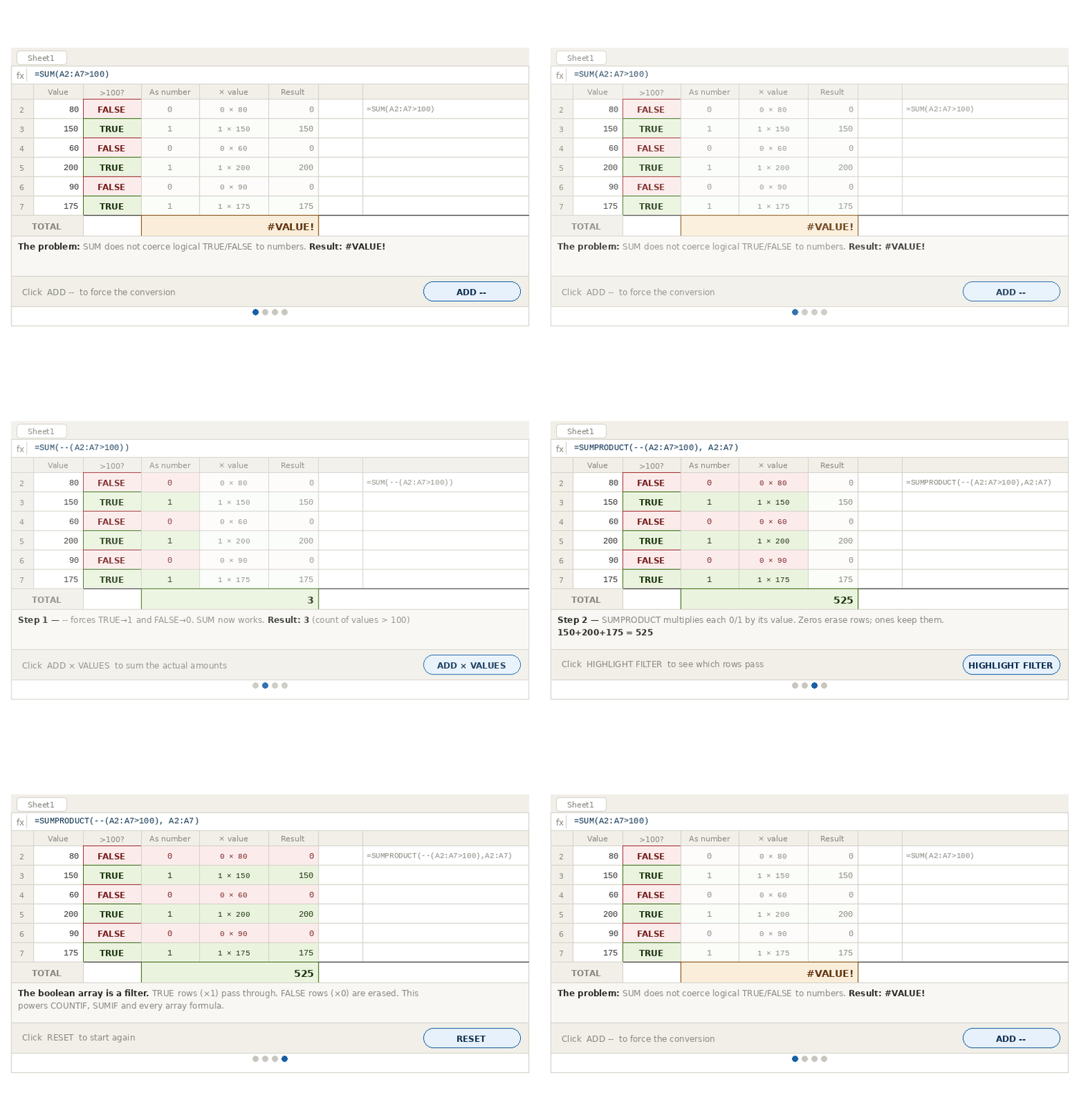
Net result: TRUE → 1, FALSE → 0. These values are now proper numbers and will be accepted by every function without hesitation.
You will see -- frequently in SUMPRODUCT formulas written by experienced Excel users. It is not just decoration; it is a deliberate type of coercion.
Three TRUEs and three FALSEs in action
Let us make this concrete with the exact six-value array from before, and trace every step of a real calculation.
We have six sales figures: 80, 150, 60, 200, 90, 175
We want the total value of sales above 100 only — not a count, but a sum of the qualifying amounts.
Formula:
=SUMPRODUCT(--(A1:A6 > 100), A1:A6)What Excel holds in memory at each stage:
| Step | Operation | Array |
|---|---|---|
| 1 | A1:A6 > 100 |
{FALSE, TRUE, FALSE, TRUE, FALSE, TRUE} |
| 2 | -- coercion |
{0, 1, 0, 1, 0, 1} |
| 3 | Multiply by A1:A6 |
{0×80, 1×150, 0×60, 1×200, 0×90, 1×175} |
| 4 | Expand | {0, 150, 0, 200, 0, 175} |
| 5 | SUM(...) |
525 |
The three FALSE rows — 80, 60 and 90 — were multiplied by zero and disappeared. Meanwhile, the three TRUE rows — 150, 200, 175 — were multiplied by one and retained their values. The sum of what remained is 525.
This pattern lies at the heart of almost every advanced Excel formula. The Boolean array is not an answer; it is a filter. Values are let through by ones. Zeros block them. Everything else is arithmetic.
You may already be doing this without realising it.
Once you have understood the pattern, you will start to recognise it in the formulas that you have been using for years.
COUNTIF(range, criteria) — counts how many cells match the criteria. Internally, compare each cell. Get 'TRUE', 'FALSE', 'TRUE', and so on. Coerce these to '1', '0', '1', and so on. Then sum them. The result is a count.
SUMIF(range, criteria, sum_range)uses the same Boolean array, but instead of adding up the ones and zeros, it multiplies the filter by the values in the sum_range first. It's exactly the same pattern as above.
AVERAGEIF: the sum of the matching values divided by the count of the matching values. Two Boolean operations, one formula.
The formula IF(condition, value_if_true, value_if_false) produces a single TRUE or FALSE value, which determines which branch is taken. The formula is different to whether you write IF(A1>100, ...) or IF(TRUE, ...) — they are identical.
The more you delve into Excel, the more you will find that Boolean arithmetic is performing tasks that resemble logic.
How this appears in the workbook
In the cost baseline workbook this series covers, Boolean logic appearing inside the core distribution formula as a gate called isActive:
isActive, periodStart <= periodEndFor each combination of category and month, Excel determines whether the category's active period overlaps with the month the current month. The result is either TRUE or FALSE. Then:
monthlyDays, IF(isActive,
    NETWORKDAYS.INTL(periodStart, periodEnd, 1, _DataFestivita),
    0)
The working day count is calculated when isActive is TRUE (which is 1). When it is FALSE (which is 0), the result is forced to zero and the category incurs no cost that month. In the traditional sense, no IF branch is taken; the boolean value directly controls whether a cost exists.
This pattern is repeated throughout advanced Excel work. Once you recognise it, you will see it in every workbook you open.
The one-line summary
TRUE = 1. FALSE = 0. Boolean arrays are filters. Multiply a value by 1 to keep it, by 0 to erase it. Sum the result. That is the engine underneath COUNTIF, SUMIF, SUMPRODUCT, and every array formula you have ever wondered about.
Everything else is detail.