Copilot in Excel and GDPR, what European businesses need to know
Important notice before you read
This article provides a general, practical overview for orientation purposes only. It does not constitute legal advice and is not intended to be comprehensive. Data protection law is complex and subject to regular change, depending on your specific situation. Therefore, before making any decisions regarding the processing of personal data, you should always consult a qualified data protection specialist or legal advisor. SafeOffice accepts no liability for decisions made on the basis of this article.
FAQ: WHAT THIS ARTICLE ANSWER?
Q: Does using Copilot in Excel mean that my data is sent to Microsoft's servers?
A:Yes. When you send a prompt to Copilot, both your input and any data visible in your workbook are transmitted to Microsoft's Azure OpenAI infrastructure for processing. Even if Microsoft does not store or use that data for training purposes, the transfer itself has already occurred, and it is this transfer that triggers GDPR obligations.
Q: Does saving an Excel file to OneDrive also create GDPR obligations?
A: Yes, and this is the a risk that many businesses overlook. Any Excel file containing personal data that is saved to OneDrive makes Microsoft a data processor under the GDPR, even if Copilot is not used. You must therefore have a signed Data Processing Agreement with Microsoft in place before storing personal data there.
Q: Our Microsoft 365 data is stored on European servers. Are we fully protected under the GDPR?
A: Not entirely. Microsoft is an American company and is therefore subject to the US CLOUD Act. This Act enables US authorities to request access to data held by US technology companies, even if that data is stored on EU servers. While EU data residency reduces risk, it does not eliminate the legal exposure created by the company's US jurisdiction.
Q: Which types of Excel data carry the highest GDPR risk when using cloud features?
A: Employee salaries, HR records, health and absence data, and any special category data, including information about union membership, religion or ethnic origin, carry the highest risk and require the most careful handling. In contrast, anonymous financial data and aggregated statistics with no individual identifiers carry little to no GDPR risk.
Q: What steps does our business need to take before using Copilot or OneDrive with personal data?
A: You should at least confirm that you have a data processing agreement with Microsoft in place, add Microsoft 365 to your Article 30 record of processing activities, update your privacy notices for employees and customers, and assess whether EU data residency is configured in your Microsoft 365 tenant. If you are processing special category data, you should consult a qualified data protection advisor before using any cloud AI features.
Excel 365 is a powerful platform, but as soon as you connect it to Copilot AI or save files to OneDrive, your data starts to move. For most workbooks, this is completely unproblematic. However, if your spreadsheet contains personal data such as employee salaries, customer records or health information, European data protection law requires you to ask some important questions before clicking the Copilot button.
This article explains what happens to your data, which GDPR-related risks are relevant, and what practical steps small and medium-sized European businesses should take.
See also: Excel 365 vs older versions — feature comparison and risk analysis
What happens when you use Copilot in Excel?
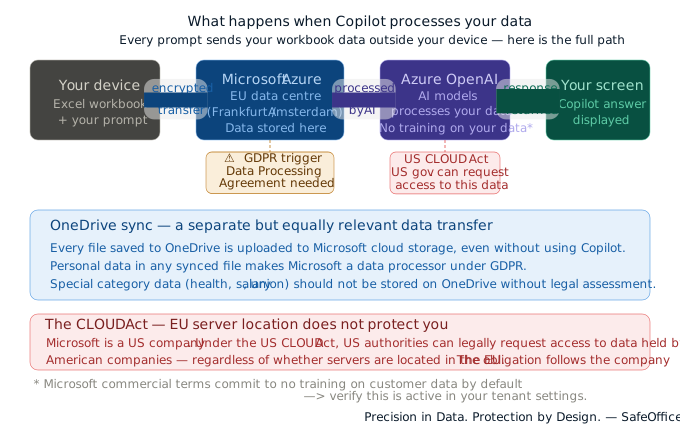
When you send a prompt to Copilot in Excel, your input and any visible data in your workbook are sent to Microsoft's Azure OpenAI infrastructure for processing. The response is then sent back to your screen.
This means that your data leaves your device. It travels to Microsoft servers, where it is processed by an AI model and a response is generated. Even if Microsoft does not permanently store or train on your data — which their commercial terms commit to by default — the transfer itself has already occurred.
For a workbook containing project costs or anonymous sales figures, this is unlikely to raise any concerns. However, for a workbook containing personal data such as names, salaries, absences or health information, it is a different matter entirely.
OneDrive: the risk that is easy to overlook
Although Copilot is the visible AI feature, OneDrive poses a more common data transfer risk for most businesses.
When you save an Excel file to OneDrive, or when the OneDrive sync is running in the background, your file is uploaded to Microsoft's cloud storage. This means:
- Your data is stored on servers outside your direct control.
- Microsoft has technical access to your files as part of providing the service.
- If those files contain personal data, Microsoft is acting as a data processor under the GDPR.
This applies even when you are not using Copilot. Any Excel file saved to OneDrive that contains personal data triggers GDPR obligations, regardless of whether AI features are enabled.
The CLOUD Act poses a unique risk to American providers.
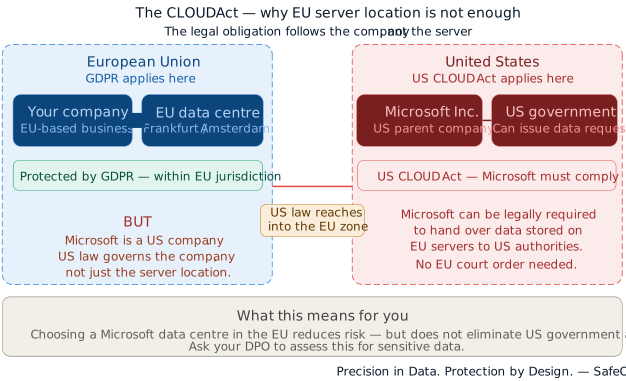
This aspect is rarely mentioned in product documentation, yet it is something that every European business should understand.
Microsoft is an American company and is therefore subject to US law. The US CLOUD Act (Clarifying Lawful Overseas Use of Data Act) enables US government authorities, under certain legal conditions, to request access to data held by US technology companies, even if that data is stored on servers in the EU.
Therefore, EU data residency — i.e. having your data stored on servers in Frankfurt or Amsterdam — does not offer complete protection against US government access requests. The legal obligation lies with the company, not the server location.
For most small businesses processing ordinary business data, this risk is theoretical. However, for businesses processing sensitive personal data, special category data or data subject to professional confidentiality (legal, medical or financial), it is a factor that must be assessed and documented.
When consulting your data protection advisor, you should ask not only "where is the data stored?" but also 'which legal system governs the company holding the data?'
What does the GDPR require when using cloud-based AI tools for personal data?
Under the General Data Protection Regulation (GDPR), you must have a legal basis for every processing activity involving personal data. Specific additional obligations apply when a third-party tool such as Copilot or OneDrive processes that data on your behalf.
Data Processing Agreement (DPA)
Before processing personal data through Microsoft's services, you must have a signed Data Processing Agreement with them. Microsoft provides this as part of the Microsoft Products and Services Agreement and the Microsoft Data Protection Addendum. However, you must confirm that it is in place for your organisation and that you have documented this.
Record of processing activities (Article 30)
Your organisation's record of processing activities must include any cloud tools used to process personal data. For example, if you use OneDrive to store HR files or Copilot to analyse customer data, this must be documented.
Transparency to data subjects Employees and customers whose data you process must be informed about the tools you use. If your privacy notice does not mention Microsoft 365 cloud processing, it may need updating.
Data transfer assessment
If personal data is transferred outside the European Economic Area — even temporarily during processing — this requires either an adequacy decision, Standard Contractual Clauses, or another valid transfer mechanism. Microsoft relies on Standard Contractual Clauses for EU-US transfers, but you need to document that you have assessed and accepted this.
Which data types carry the highest risk
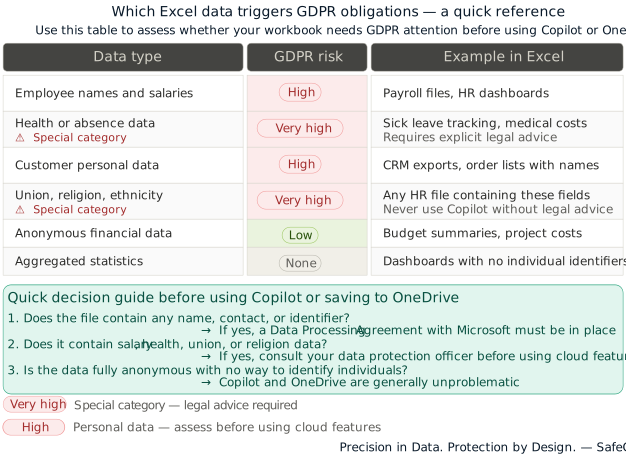
Not all Excel data is equal under GDPR. Here is a simple overview:
| Data type | GDPR risk | Example in Excel |
|---|---|---|
| Employee names and salaries | High | Payroll files, HR dashboards |
| Health or absence data | Very high — special category | Sick leave tracking, medical costs |
| Customer personal data | High | CRM exports, order lists with names |
| Union membership, religion, ethnicity | Very high — special category | Any HR file containing these fields |
| Anonymous financial data | Low | Budget summaries, project costs |
| Aggregated statistics | None | Dashboards with no individual identifiers |
Special category data — health, religion, ethnic origin, union membership, biometric data — carries the highest obligations under GDPR and should never be processed through Copilot without explicit legal advice.
Practical rules for your business
These are not legal requirements — they are practical starting points for a conversation with your data protection advisor.
Before using Copilot on any file, ask:
- Does this workbook contain names, contact details, or any data that identifies a person?
- Does it contain salary, health, or other sensitive personal information?
- If yes to either — do not use Copilot on this file until you have assessed the implications.
For OneDrive:
- Do not store HR files, payroll data, or health-related spreadsheets on OneDrive without first checking your DPA and assessing the transfer implications
- Consider keeping special category data on local or on-premises storage only
- If you do use OneDrive for personal data, ensure EU data residency is configured in your Microsoft 365 tenant settings
For your internal documentation:
- Add Microsoft 365 (including Copilot and OneDrive) to your Article 30 record of processing activities
- Note which data categories are processed through these tools
- Review and update your employee and customer privacy notices
For your IT or Microsoft 365 administrator:
- Confirm EU data residency is enabled for your tenant
- Review Copilot access settings — consider restricting Copilot for users who work with HR or health data
- Check that the Microsoft Data Protection Addendum is activated for your organisation
The bottom line for most small businesses
For the majority of Excel use cases — project budgets, sales reports, inventory tracking, financial planning — using Copilot and OneDrive is unlikely to raise significant GDPR concerns, provided a Data Processing Agreement with Microsoft is in place.
The key is knowing which workbooks contain personal data and applying a clear internal rule:
- Anonymous or financial data → Copilot and OneDrive are generally fine
- Personal data (names, contacts, HR) → assess before using cloud features
- Special category data (health, salaries, union membership) → consult a specialist before using any cloud AI features
Excel 365 is a legitimate, powerful tool for European businesses. The GDPR implications are manageable — but they require awareness, documentation, and in some cases professional advice.
At SafeOffice, our approach to every tool we document and every workflow we recommend is guided by one principle: Precision in Data. Protection by Design. Knowing where your data goes is not a legal burden — it is good practice.
💡 This article is intended as a starting point for awareness, not as legal guidance. Data protection requirements vary by country, sector, and the specific nature of the data you process. Always consult a qualified data protection officer or legal advisor for decisions affecting your organisation.
What to read next
See also: Excel 365 vs older versions — features, ROI, and risk analysis